
What AI projects actually strengthen a portfolio in 2026?
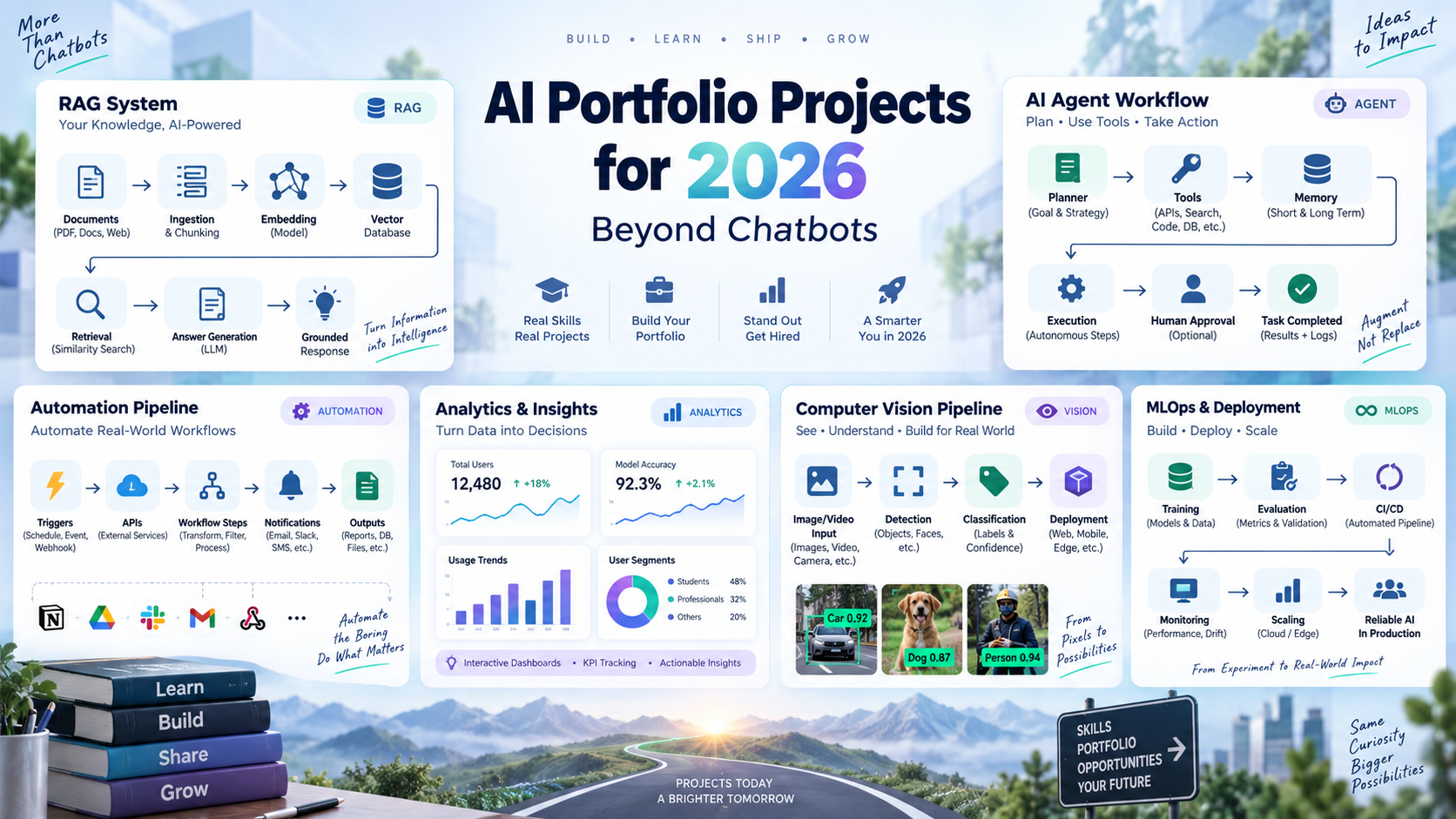
The AI portfolio projects that stand out in 2026 solve a specific real-world problem and show how you handle data, workflows, users, evaluation, safety, deployment, and trade-offs. A basic chatbot clone rarely demonstrates enough. Stronger examples include a support-triage copilot with human approval, a RAG system with citations and measured retrieval quality, or a forecasting workflow that turns messy sales data into recommendations a manager can act on.
The goal is not to build the most complex project. It is to build something that looks like real work: a clear user problem, a usable system, realistic constraints, measured results, and honest documentation of what did not work.
Key takeaways
- A strong AI portfolio in 2026 proves you can solve a real problem, not just call an LLM API or clone a chatbot.
- Show technical depth, business context, evaluation, safety, deployment, and results you actually measured.
- RAG, AI agents, automation, analytics, fine-tuning, and multimodal systems make stronger evidence than generic Q&A apps.
- Freshers should start with one beginner-friendly project and deepen it, rather than attempting an advanced multi-agent system first.
- Document every project with a README, architecture diagram, demo video, evaluation results, and limitations.
- Three to five polished projects are generally more valuable than many unfinished repositories.
Table of contents
- Why generic chatbots do not stand out
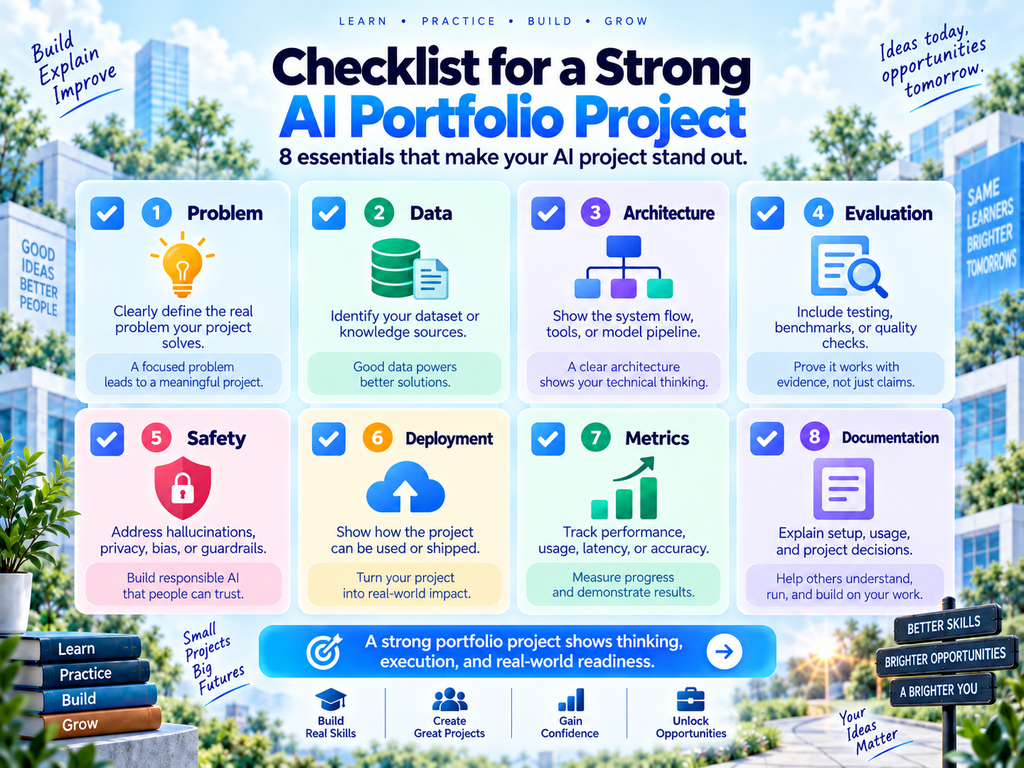
- What makes an AI portfolio project strong?
- 10 real-world AI portfolio projects for 2026
- Best AI portfolio projects for freshers
- Choose projects by career path
- How to document and present every project
- Common AI portfolio mistakes
- How OneLeap programmes map to these projects
- Frequently asked questions
- Final thoughts
Why generic chatbots do not stand out
A generic “chat with PDF” demo is useful for learning, but it is rarely enough on its own. Anyone reviewing your work will look for how you think about data quality, retrieval, citations, access control, testing, error handling, cost, latency, and the business problem the application solves.
Instead of discarding a chatbot-style idea completely, turn it into a real system. Add a defined user, trusted data sources, permissions, source citations, evaluation cases, feedback collection, an escalation route, and a deployed interface. That turns a toy demo into evidence of engineering judgement.
What makes an AI portfolio project strong?
| Portfolio signal | What it means in practice |
| Specific problem | State who the user is, what they struggle with, and why the problem matters. |
| Realistic data | Use public, synthetic, or permissioned datasets that resemble the target domain. |
| End-to-end workflow | Show ingestion, processing, model use, output, review, and delivery, not a single notebook cell. |
| Evaluation | Measure what “good” looks like (accuracy, grounding, retrieval quality, completion rate, latency, or cost) and explain how you measured it. |
| Safety and reliability | Include validation, human review, permissions, fallback handling, and clear limitations. |
| Honest impact claims | Estimate time saved or business impact only with a stated method, such as timing manual and assisted runs of the same task. |
| Deployment or demo | Provide a live demo, recorded walkthrough, API documentation, or screenshots that make the work easy to assess. |
| Business communication | Explain the decision or workflow improvement your project enables. |
10 real-world AI portfolio projects for 2026
These AI project ideas for 2026 span engineering, agents, automation, and analytics. Each includes a difficulty level, a rough build time, a suggested stack, public data to start with, and the extra step that makes it stand out. Build times assume around 8–10 hours a week alongside study or work, so treat them as ballpark figures.
Difficulty levels: Beginner-friendly means basic Python or a no-code workflow tool is enough. Intermediate means you are comfortable with Python, APIs, and a database. Advanced assumes you have already built at least one LLM application.
1. Enterprise knowledge assistant with citations
Build a knowledge system over a public policy library, product documentation set, or compliance handbook. Users ask questions and receive grounded answers with source links, confidence signals, and a route to escalate unclear questions to a human. This is the RAG project most portfolios need, but it only counts if you measure it properly.
Difficulty and time: Intermediate · 3–4 weeks
What it demonstrates: RAG, document ingestion, chunking, embeddings, retrieval, reranking, source citations, access control, evaluation
Suggested stack: Python, FastAPI, an LLM API, Chroma, FAISS or another vector database, LangChain or LlamaIndex, a simple web UI
Data to start with: The documentation of an open-source project or a government policy handbook. Check the licence before republishing any content in a demo.
Make it stand out: Create a test set of 50–100 questions with known answers, then report retrieval hit rate, citation correctness, latency, and known failure cases.
2. Customer-support copilot with human handoff
Build a system that classifies incoming tickets, detects urgency and sentiment, drafts a reply using help-centre content, and routes sensitive cases to a human agent. Unlike project 1, the core challenge here is the workflow (classification, routing, and approval) rather than question answering. Never send messages automatically in the demo; make human approval a visible step.
Difficulty and time: Intermediate · 3–4 weeks
What it demonstrates: Classification, structured outputs, workflow automation, guardrails, approval logic, monitoring
Suggested stack: An LLM API, Python or n8n, a helpdesk sandbox, a database
Data to start with: The Bitext customer-support dataset on Hugging Face, or a set of synthetic tickets you write and label yourself.
Make it stand out: Report routing accuracy, escalation accuracy, and the share of drafts a reviewer accepts without edits. To estimate handling-time savings, time 20 tickets handled manually and 20 handled with the copilot, and publish the method alongside the result.
Stretch goal: Add a voice channel (speech-to-text in, text-to-speech out) and report end-to-end response latency.
3. AI-powered sales intelligence and lead-routing workflow
Build a workflow that accepts a lead form, enriches it from approved public data, creates a concise account brief, scores the lead against transparent criteria, routes it to the right sales rep, and drafts a follow-up. Add explicit review steps so users can correct bad enrichment or scoring. This is one of the most accessible AI automation projects, because most of it can be built in a no-code workflow tool.
Difficulty and time: Beginner-friendly · 2–3 weeks
What it demonstrates: AI automation, APIs, CRM integration, data enrichment, prompt design, workflow reliability, business ROI
Suggested stack: n8n or a similar workflow tool, a CRM sandbox, webhooks, an LLM API, optional Python or JavaScript
Data to start with: Synthetic leads generated with a library such as Faker, plus publicly available company information. Avoid collecting personal data; if you handle any, follow the consent and purpose-limitation principles of India’s Digital Personal Data Protection Act, 2023.
Make it stand out: Show before-and-after workflow maps. Estimate research time saved per lead by timing ten leads researched manually and ten researched with the workflow.
4. AI-assisted revenue forecasting and KPI monitoring system
Build an analytics product that ingests historical sales or subscription data, forecasts revenue, monitors KPIs, flags anomalies, alerts the right owner, and generates a reviewable executive summary. Make every assumption explicit. This is a strong centrepiece for a data analyst portfolio.
Difficulty and time: Beginner-friendly for analysts · 2–4 weeks
What it demonstrates: Data analysis, forecasting, anomaly detection, alerting, dashboards, AI-assisted reporting, business storytelling
Suggested stack: Python, Pandas, a forecasting library, Power BI or Tableau, an LLM API for summaries
Data to start with: The Online Retail II dataset from the UCI Machine Learning Repository, or the M5 Forecasting dataset on Kaggle.
Make it stand out: Compare a simple baseline forecast (such as the same period last year) with your model, report the error for both, and explain where the system should not be trusted.
5. Document intelligence pipeline for invoices or contracts
Create a workflow that receives invoices, contracts, or purchase orders; extracts structured fields; validates required values; flags exceptions; and sends uncertain cases to a review queue.
Difficulty and time: Beginner-friendly to intermediate · 2–3 weeks
What it demonstrates: OCR and document parsing, structured extraction, validation, workflow design, error handling, audit trail
Suggested stack: Python, an OCR tool or document parser, an LLM API with JSON-schema outputs, a database, a workflow tool
Data to start with: SROIE or CORD for scanned receipts, or CUAD for contracts. Use synthetic or public documents only, never real personal or confidential data.
Make it stand out: Add validation rules, confidence thresholds, and audit logs; report field-level extraction accuracy; and build a dashboard of exception types.
6. Multi-agent market or research intelligence system
Build a system in which specialised agents research sources, extract structured facts, compare competitors or trends, check claims against citations, and assemble a report for human review. Make the agent roles and handoffs explicit rather than using multiple agents for novelty. This is the most demanding of the AI agent projects here, so build it after you have shipped a simpler one.
Difficulty and time: Advanced · 4–6 weeks
What it demonstrates: Agent orchestration, tool use, planning, source traceability, state management, human approval
Suggested stack: Python, LangGraph or an agent SDK, search and data tools exposed through Model Context Protocol (MCP) servers, a database, an LLM API
Data to start with: Public sources in one sector you understand, such as company filings, product pages, or industry reports.
Make it stand out: Publish a benchmark comparing a single-agent workflow with your multi-agent approach on quality, time, and cost. If the single agent wins, say so; that is a valuable finding.
7. AI evaluation and prompt-regression testing platform
Build a lightweight platform that lets a team store prompts, run test datasets, compare models or prompt versions, score outputs, track latency and cost, and catch regressions before an AI feature is released.
Difficulty and time: Intermediate to advanced · 3–4 weeks
What it demonstrates: Evaluation, quality assurance, prompt versioning, metrics, dashboards, LLMOps thinking
Suggested stack: Python, FastAPI, a database, an evaluation library, LLM APIs, a dashboard framework
Data to start with: The test sets you built for projects 1, 2, or 5. This project pairs naturally with any of them.
Make it stand out: Include automated checks for JSON validity, factual grounding, refusal behaviour, and task-specific quality rubrics.
8. Code-review assistant with safe approval gates
Build an internal developer assistant that reads a pull-request diff, identifies potential issues, proposes tests, summarises changes, and drafts review comments. Keep final approval with a human reviewer and clearly label suggestions as non-authoritative.
Difficulty and time: Advanced · 4–5 weeks
What it demonstrates: Code understanding, agents, GitHub integration, tool calling, testing, safe human-in-the-loop design
Suggested stack: Python, the GitHub API, an LLM API, an agent framework, a CI sandbox
Data to start with: Pull requests from an open-source repository you know, plus a set of changes into which you deliberately seed known bugs.
Make it stand out: Evaluate suggestions against the seeded bugs and report precision, recall, false positives, and failure modes.
9. Multimodal product quality-inspection assistant
Build a system that analyses product images to detect defects, classify their type, and explain each finding in plain language for a quality-control reviewer. Route uncertain predictions to a human and define clear limitations.
Difficulty and time: Intermediate to advanced · 3–4 weeks
What it demonstrates: Vision-language models, image classification, anomaly detection, explanation generation, quality controls
Suggested stack: A vision-language model API, Python, a classical computer-vision baseline, storage, a review UI
Data to start with: The MVTec Anomaly Detection (MVTec AD) dataset. Its licence restricts commercial use, which is fine for a non-commercial portfolio.
Make it stand out: Compare the vision-language model with a classical baseline and report accuracy by defect category, including where both perform poorly.
10. Domain-specific fine-tuned small language model
Fine-tune a small open-weight language model for one narrow task, such as classifying support tickets, extracting fields from one document type, or handling Hinglish customer queries, and compare it with prompting a large hosted model. This shows you understand when fine-tuning is worth it and when it is not, a trade-off that prompting-only portfolios never demonstrate.
Difficulty and time: Advanced · 3–5 weeks
What it demonstrates: Dataset preparation, parameter-efficient fine-tuning (LoRA), evaluation, cost and latency analysis, model serving
Suggested stack: Hugging Face Transformers, PEFT, a small open-weight model, a GPU notebook environment, an evaluation harness
Data to start with: The labelled tickets from project 2, or a public classification dataset in your chosen domain. Keep a held-out test set the model never sees during training.
Make it stand out: Publish a comparison of the fine-tuned model against a prompted large model on accuracy, latency, and cost per 1,000 requests.
Best AI portfolio projects for freshers
If you are building an AI portfolio as a fresher, resist starting with the most impressive-sounding idea. A finished, well-documented beginner project beats an abandoned multi-agent system. A practical sequence:
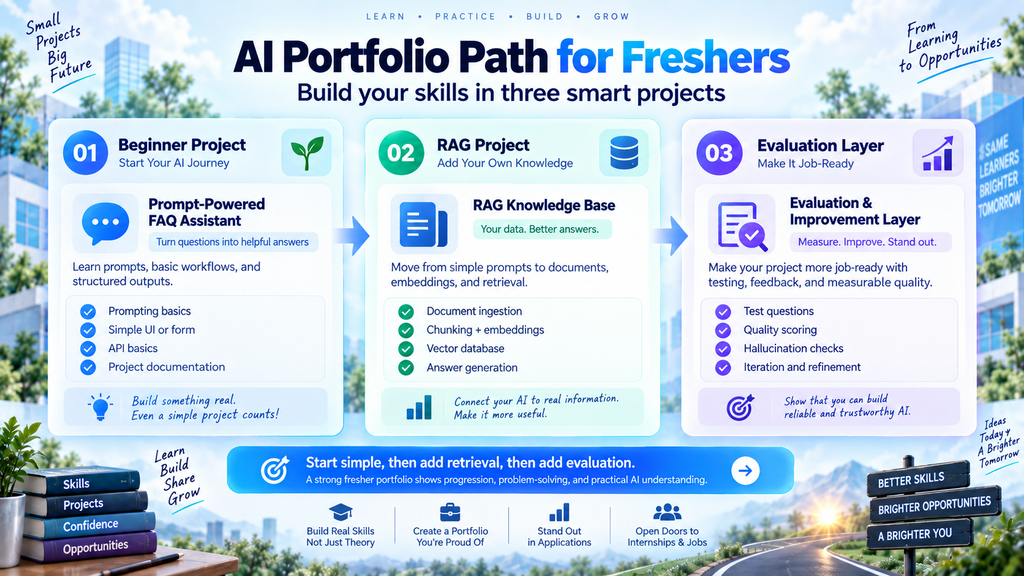
- Start with one beginner-friendly project. Choose document intelligence (project 5) if you code, lead routing (project 3) if you prefer no-code tools, or revenue forecasting (project 4) if you are aiming for analytics roles.
- Build a RAG project next. The enterprise knowledge assistant (project 1) teaches retrieval, evaluation, and deployment in a single system.
- Add an evaluation layer. Turn the test set from step 2 into a small regression-testing tool (project 7). This is a strong signal of engineering maturity at any level.
Three projects built this way, each deployed, documented, and measured, make a credible portfolio for an entry-level role. Non-technical learners can follow the same path using projects 3 and 4, adding SQL and Python as their confidence grows.
Choose projects by career path
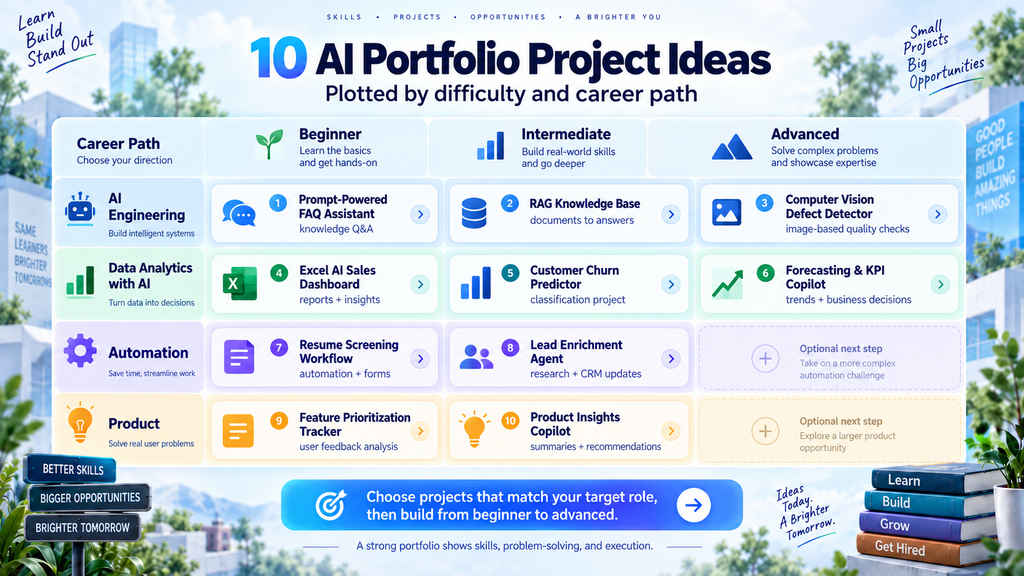
Whether you are building an AI engineer portfolio or a data analyst portfolio, match your projects to the role you want.
| Career target | Best project types |
| AI Engineer / LLM Engineer | Enterprise knowledge assistant (1), customer-support copilot (2), evaluation platform (7), multimodal inspection assistant (9), fine-tuned small model (10) |
| AI Agents Developer | Research intelligence system (6), code-review assistant (8), tool-using support workflow (2) |
| AI Automation Engineer | Lead routing (3), document intelligence (5), support triage (2), KPI alerts (4) |
| Data Analyst / Analytics Engineer | Revenue forecasting and KPI monitoring (4), document intelligence (5), plus sales analysis, customer segmentation, and AI-powered reporting |
| AI Product Manager | Build a product case study around one project: user research, problem framing, metrics, PRD, risk assessment, prototype, and experiment design. |
For AI product-management skills and case-study expectations, see AI Product Manager Skills in 2026.
How to document and present every project
- Write a one-sentence problem statement: who has the problem, and what outcome are you improving?
- Add a README with architecture, stack, setup steps, screenshots, and a short demo video.
- Explain the data: source, licence or permissions, cleaning steps, limitations, and how you handled sensitive information.
- Document the AI design: model choice, prompts, retrieval or agent flow, validation, and fallback behaviour.
- Publish evaluation results (quality metrics, latency, cost, completion rate, error rate, or time saved) and explain how each was measured.
- Include a section called “What failed and what I would improve”, which demonstrates mature engineering judgement.
- Create a concise portfolio page and a LinkedIn post that explains the business problem, your solution, and one measurable result.
Example: an evaluation summary
A short table like this in your README makes results easy to assess. The figures below are illustrative only, for a project 1 knowledge assistant; your own numbers will differ.
| Metric | Result | How it was measured |
| Retrieval hit rate (top 5) | 86% | 80 hand-written questions with known source passages |
| Citation correctness | 91% | Manual check of cited passages for the same 80 answers |
| Median latency | 2.4 s | 200 requests to the deployed demo |
| Escalation rate | 12% | Share of questions routed to a human instead of answered |
| Known failure | Tables in PDFs | Answers drawn from table content were wrong in 7 of 15 cases |
Common AI portfolio mistakes
- Publishing only generic chatbot clones without a user, domain, evaluation, or differentiated workflow.
- Using a complex stack that you cannot explain or debug in an interview.
- Skipping deployment, demo videos, screenshots, or documentation that make the project assessable.
- Claiming accuracy, time savings, or business impact without stating how you measured it.
- Ignoring privacy, permissions, bias, hallucinations, prompt injection, or human-review needs.
- Building ten shallow projects instead of a small number of thoughtful, polished ones.
- Using AI-generated code without understanding the architecture, data flow, errors, and limitations.
How OneLeap programmes map to these projects
OneLeap’s programmes are built around portfolio evidence rather than theory alone, and many OneLeap AI projects overlap directly with the ideas above. Where a project is not covered, the programmes still build the skills to attempt it independently.
| Project in this article | Closest OneLeap project | Coverage |
| 1. Enterprise knowledge assistant | Enterprise RAG system (AI Engineering Mastery) | Direct |
| 2. Customer-support copilot | Full-stack AI application; enterprise RAG system (AI Engineering Mastery) | Partial |
| 3. Lead-routing workflow | AI-powered report generator (Strategic Data Analyst with AI) | Partial |
| 4. Revenue forecasting and KPI monitoring | Predictive revenue forecasting; business KPI dashboard (Strategic Data Analyst with AI) | Direct |
| 5. Document intelligence pipeline | Not a programme project | Build independently |
| 6. Multi-agent research system | Autonomous research agent; multi-agent orchestrator (AI Engineering Mastery) | Direct |
| 7. Evaluation platform | Prompt evaluation framework; AI safety and monitoring dashboard (AI Engineering Mastery) | Direct |
| 8. Code-review assistant | Multi-agent orchestrator (AI Engineering Mastery) | Partial |
| 9. Multimodal inspection assistant | Multimodal content pipeline (AI Engineering Mastery) | Partial |
| 10. Fine-tuned small model | Domain-specific fine-tuned model (AI Engineering Mastery) | Direct |
AI Engineering Mastery also includes a transformer built from scratch and a full-stack AI application. Strategic Data Analyst with AI also covers sales performance analysis, customer segmentation, a company-data Q&A system, and an end-to-end analytics solution.
Build production-grade AI systems with OneLeap AI Engineering Mastery.
Build business-first analytics and AI workflow projects with OneLeap Strategic Data Analyst with AI.
Frequently asked questions
What AI projects look best on a portfolio in 2026?
The strongest projects pair a realistic workflow with published evaluation results. In practice, that usually means a RAG system with measured retrieval quality, an agent or automation workflow with human approval, or an analytics system that beats a simple baseline.
What is the best first AI project for a fresher?
A document intelligence pipeline, a no-code lead-routing workflow, or a revenue forecasting project. Each is achievable in two to four weeks part-time and builds evaluation habits you can carry into harder projects.
How many AI projects should I include in my portfolio?
Aim for three to five polished projects with clear documentation, demos, and evidence of impact. One substantial project can be more valuable than several incomplete or copied repositories.
How long does it take to build an AI portfolio?
Following the three-project path for freshers at around 8–10 hours a week, expect roughly three months, including time to document and deploy each project. Treat this as a ballpark; depth matters more than speed.
Is a RAG project still worth building in 2026?
Yes, if it goes beyond “chat with a PDF”. A RAG project in your portfolio should include a defined user, permissions, citations, a test set, and published retrieval metrics. Without evaluation, it reads as a tutorial.
Do I need fine-tuning experience for an AI engineer portfolio?
Not always, but it helps. Many roles rely mostly on prompting and retrieval, so a fine-tuning project is most valuable when it shows you can judge when fine-tuning beats prompting, and when it does not.
Do I need to deploy AI portfolio projects?
Deployment is strongly recommended because it shows you can move beyond notebooks. If full deployment is not feasible, provide a recorded walkthrough, architecture diagram, setup instructions, screenshots, and reproducible code.
Can non-technical learners build AI portfolio projects?
Yes. Start with the lead-routing and forecasting projects, which rely on no-code workflow tools, spreadsheets, and dashboards. Add SQL and Python gradually, then extend the same projects rather than starting over; an upgraded project shows growth clearly.
Should I use a specific domain for my AI projects?
Yes. Choose a domain you want to work in, such as finance, retail, SaaS, healthcare operations, marketing, education, or customer support, and build projects around realistic decisions in that domain. This makes your portfolio easier for relevant employers to understand.
Where can I learn to build real-world AI projects?
Look for learning paths that include current technical skills, realistic projects, detailed feedback, portfolio coaching, and career support. The right programme depends on whether you want to focus on production AI engineering, analytics, automation, or product work. OneLeap’s AI Engineering Mastery and Strategic Data Analyst with AI programmes are two options built around projects like the ones above.
Final thoughts
In 2026, the best AI portfolio projects look like useful products, workflows, or decision systems, not demonstrations of a single model call. Choose a real user problem, build a thoughtful solution, measure what matters, document limitations, and make your work easy to review.
Ready to build AI portfolio projects that employers can recognise as real experience? Explore OneLeap’s learning paths to develop project depth, technical confidence, and a portfolio that reflects the AI role you want.
Explore OneLeap: theoneleap.com
Browse OneLeap programmes: theoneleap.com/programmes

Leave a Reply