
Introduction
Vibe coding is changing the way we make software by making it quicker to turn an idea into something that actually works. But the real benefit of vibe coding is not just that it is fast. It is also about learning how to use coding tools in a responsible way. This means you can still make software that you can count on that you can test and that is ready to be used by people.
For people who are already working as software engineers, data scientists, machine learning engineers and people who are trying to get into the field of intelligence this change is really important. The reason is that the job is not about writing code one line at a time anymore. Vibe coding is, about working with intelligence looking at what it comes up with understanding how the whole system is designed and knowing when you need to use your own judgment to make decisions instead of relying on the model
Key Takeaways
- Vibe coding is about using language and AI tools to write, change or understand code quickly.
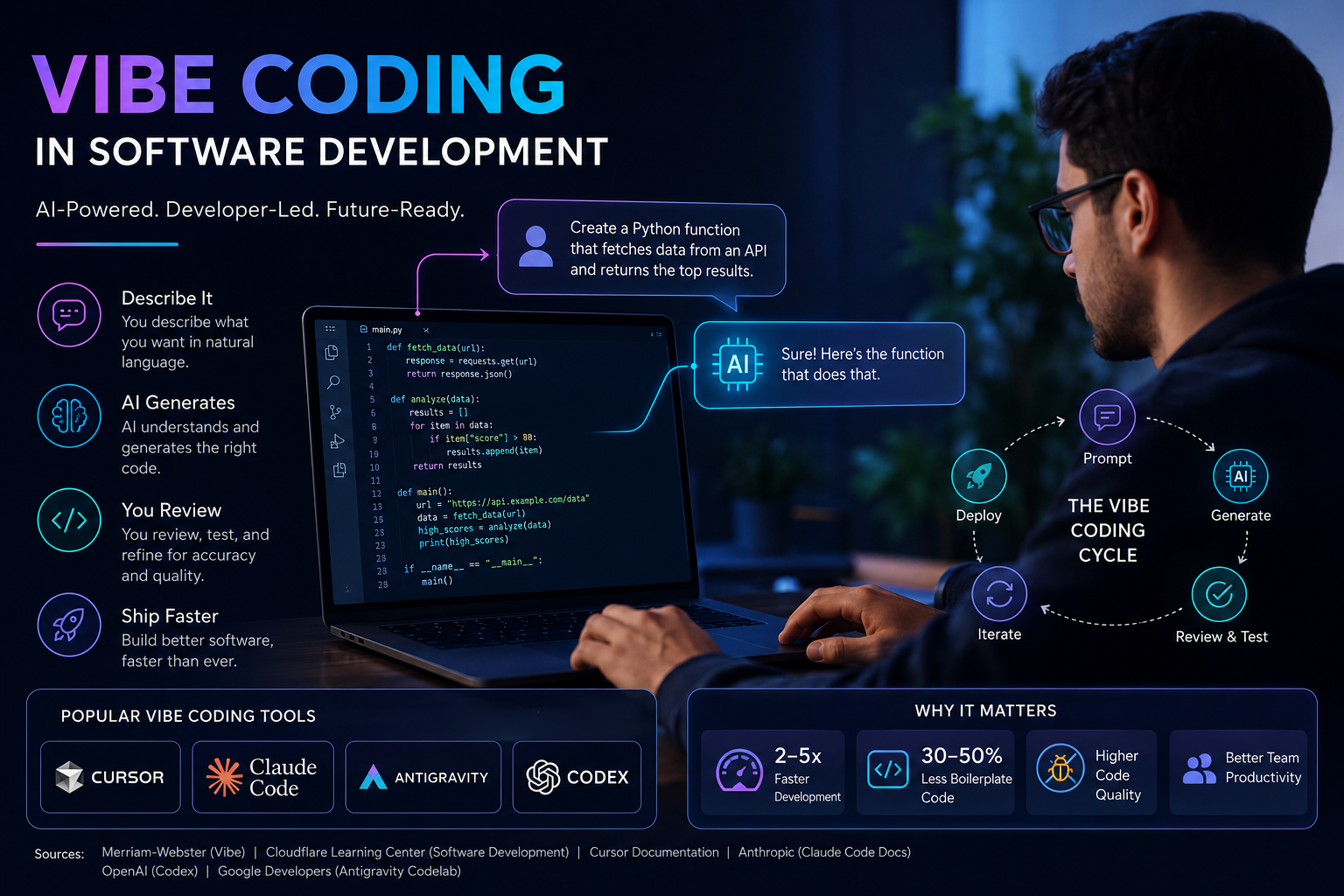
- Some tools are better for jobs. For example Cursor is great for editing Claude Code is best for working in the terminal and with whole repositories Antigravity is good for workflows that start with an agent and Codex is helpful for general engineering tasks.
- AI tools can help with getting ideas working fast making code better checking for errors and fixing problems.. They do not replace the need for good engineering judgment.
- AI systems that are used in real-world applications still need planning, testing, monitoring, safety measures and cost control.
- OneLeap’s AI Engineering Mastery program is a fit for now because it teaches people how to create AI systems that are ready, for use not just how to use AI tools.
Table of Contents
- Title
- Direct Answer Introduction
- Key Takeaways
- Table of Contents
- Definition Section
- Why It Matters
- How It Works
- Core Components
- Tools Section
- Real Examples
- Comparison Section
- Best Practices
- Common Mistakes
- FAQs
- Final Summary
What Is Vibe Coding in Software Development?
Vibe coding is a way of making software where you tell the computer what you want in language, and a special tool helps make, change, or explain the code. This means you use a computer program to help you code so you do not have to type every line by yourself. You can ask this tool to help you make a part of the program, create the things people see on the screen, make tests to see if it works, find mistakes, or change a big part of the program to make it better. This way of working is faster because you do not have to start from nothing every time. You use the computer to try things and not do the same tasks over and over.
This does not mean that knowing how to code is not important anymore. It means that if you want to be really good at coding, you need to know things. People who know how to make the parts of a program work together, know about the rules that control how programs talk to each other, and know how to test and put programs on computers can use vibe coding to make more things. People who do not know the basics might only be able to make simple programs that do not work very well.
What Is Vibe Coding in Software Development?
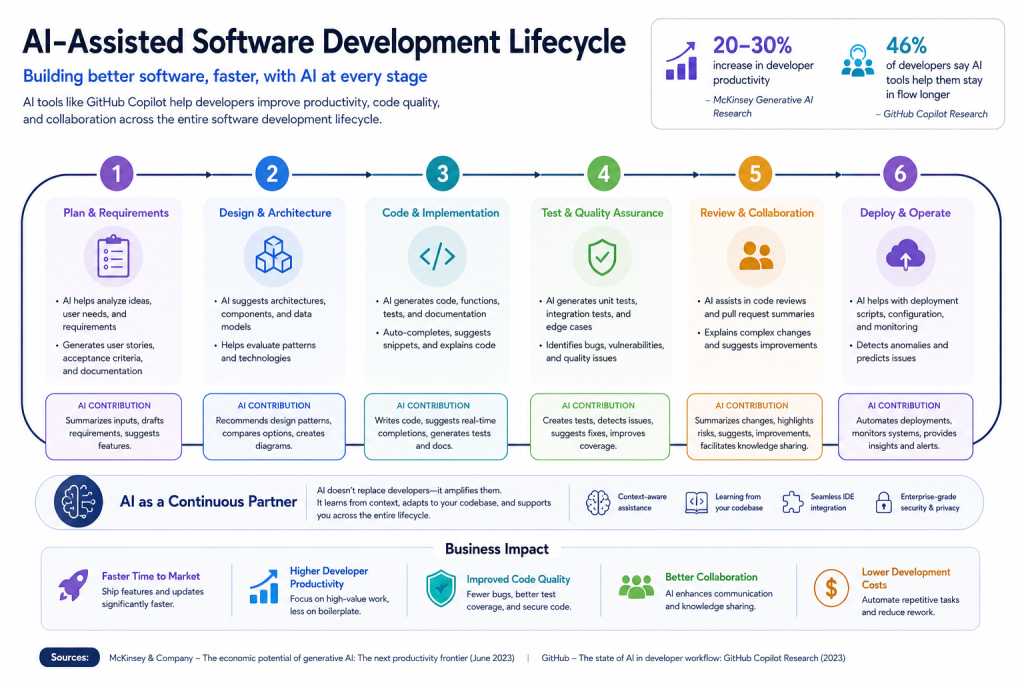
Vibe coding is really important because the way we develop software has changed a lot. A developer who can turn an idea into something that actually works fast can try out ideas faster work with others better and get things done more quickly. This is especially true when we are talking about intelligence development, where things are changing really fast and teams often need to make a simple version of something before they spend a lot of time and money on it. If a developer can make and change code quickly it can save a lot of time. Help teams figure out what works sooner.
There is another thing to think about. Code that is made by intelligence can be missing some parts, not work well together or be technically correct but not very good, in real life. That is why vibe coding should be used to help us work faster not to replace the work that engineers do.
How Vibe Coding Works: The AI-Assisted Development Workflow
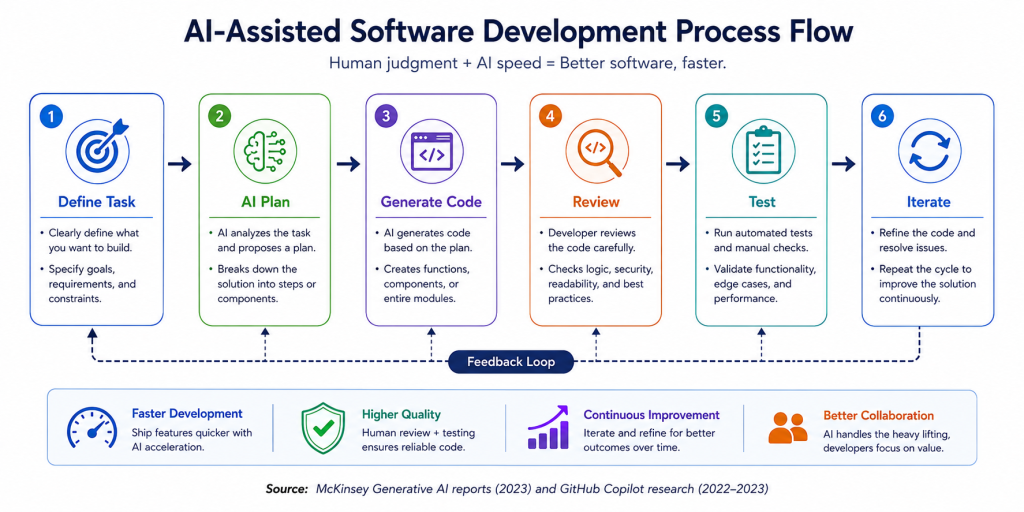
The strongest way to use vibe coding is to combine AI speed with engineering discipline.
| Step | What to Do | Why It Matters |
| 1 | Define the task clearly. | Better prompts lead to better output. |
| 2 | Ask the AI to propose a plan. | Helps avoid random code generation. |
| 3 | Generate or modify the code. | Speeds up implementation. |
| 4 | Review the output manually. | Catches mistakes and weak logic. |
| 5 | Run tests and validate edge cases. | Protects quality and reliability. |
| 6 | Refine and repeat. | Improves the final system over time. |
This roadmap works because it keeps AI in the role of assistant, not authority. It also helps you build the habit of checking structure, logic, and reliability before shipping.
The 5 Core Components of Vibe Coding
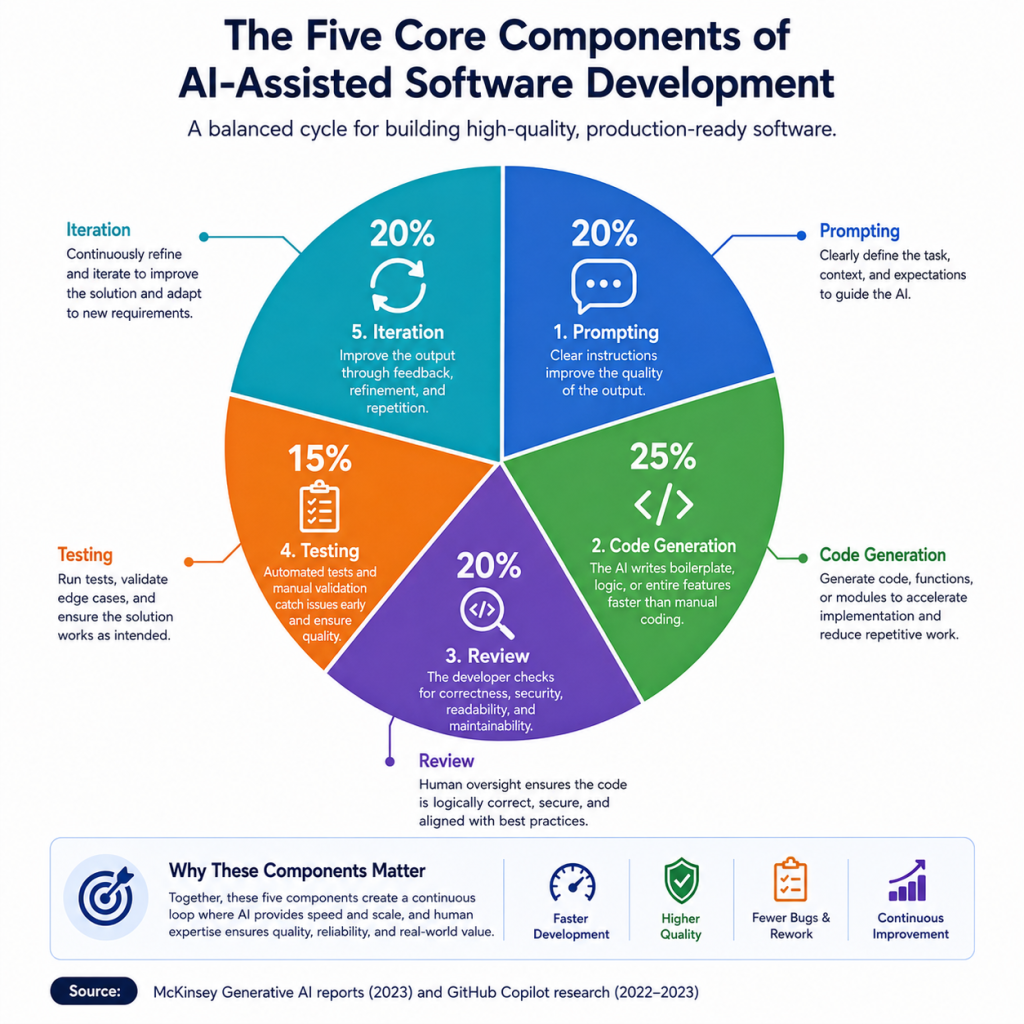
Vibe coding in real software development usually depends on five major components.
- Prompting. Clear instructions improve the quality of the output.
- Code generation. The AI writes boilerplate, logic, or entire features faster than manual coding.
- Review. The developer checks whether the code is logically correct, secure, and maintainable.
- Testing. Automated tests and manual validation catch failures early.
- Iteration. The developer improves the output through repeated feedback and refinement.
These components matter because the goal is not just “code that runs.” The goal is software that can survive real usage, scaling, and future changes.
Best AI Coding Tools for Vibe Coding in 2026
If you are exploring vibe coding seriously, four tools stand out right now: Cursor, Claude Code, Google Antigravity, and Codex. Each tool supports a slightly different workflow, and each is better suited to a different kind of developer.
| Tool | Best Fit | Strengths | Best For |
| Cursor | Fast in-editor building and iteration | Strong autocomplete, editor-first workflow, multi-file edits, agent features | Developers who want a VS Code-like experience and quick day-to-day coding speed |
| Claude Code | Terminal-based project-level work | Understands entire codebases, runs tests, makes multi-file changes, and works as an agentic coding system | Engineers who want deeper repo awareness and autonomous task execution |
| Google Antigravity | Agent-first development workflows | Designed for autonomous planning, execution, and verification across coding and non-coding tasks | Teams exploring broader agent orchestration and verified agent workflows |
| Codex | General engineering automation | Helps write code, review code, debug problems, understand codebases, and automate repetitive tasks | Developers who want a flexible assistant across planning, building, and review |
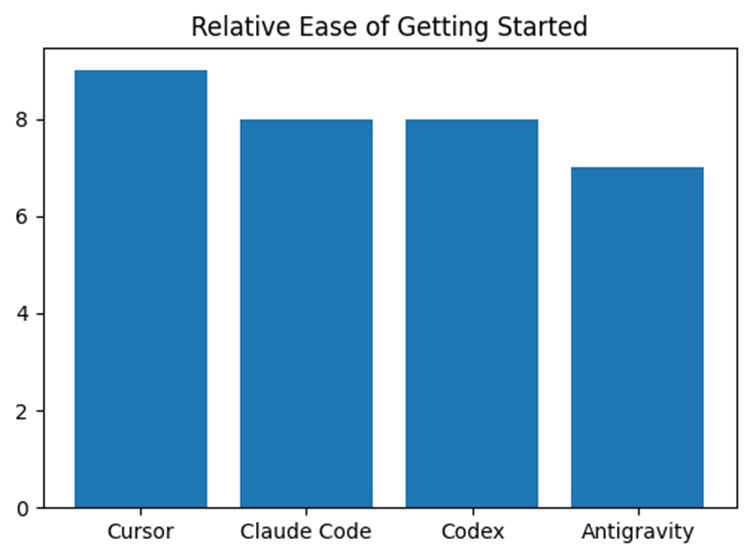
The cursor is usually the way to get started with vibe coding because it is a lot like the code editor you are used to but it also gives you AI help right in your workflow. When you have to work on a lot of files or need to think about the project Claude Code is a better choice because you can use it from the terminal. Codex is an option when you need a coding agent that can help you with everything like writing code looking it over and finding mistakes. Antigravity is different from the others because it is, about the agent. It is really good if you want to plan do and check your work as part of a workflow that is managed for you.
Real-World Examples of Vibe Coding
| Scenario | How vibe coding is used | Best tool fit |
| Startup MVP build | A founder wants to launch a working AI feature in a few days, so they use AI to scaffold the app, generate UI, and connect APIs quickly. | Cursor |
| Enterprise refactor | A software engineer needs to clean up a large legacy codebase, understand dependencies, and make multi-file updates safely. | Claude Code |
| AI agent workflow | A team is building an autonomous support assistant that must plan tasks, act across tools, and verify results before responding. | Google Antigravity |
| Code review and automation | A team wants help generating tests, reviewing pull requests, and accelerating routine engineering tasks across the release cycle. | Codex |
| Data science to product | A data scientist has a notebook model and wants to turn it into a maintainable API with tests and a simple interface. | Claude Code or Codex |
| Career switcher portfolio project | A learner building their first AI-powered SaaS uses AI coding help to move from idea to prototype while learning architecture. | Cursor |
Scenario descriptions
• A startup founder can use vibe coding to build a prototype for an AI customer-support feature. This way they do not have to wait for an engineering cycle. The goal is to validate the idea test it with users and decide if it is worth investing time and resources into vibe coding and AI.
• A software engineer working on an internal platform can use vibe coding to trace code across multiple files. This helps them refactor safely. Reduce the time spent on repetitive edits. It is especially useful when the repository is complex and the engineer needs to move without losing context while using vibe coding.
• A team building an AI assistant for support or research may use an agent- platform. The system can plan actions execute tasks and verify outputs before returning results with the help of AI and vibe coding. This kind of workflow is closer to production AI than code generation.
• A data scientist can use AI coding help to convert an experiment into a service. For example they can create an API or dashboard with a structure and testing using vibe coding. Many AI projects fail not in modeling. In the handoff from analysis to software so AI and vibe coding can be helpful here.
Cursor vs Claude Code vs Codex vs Google Antigravity
| Tool | Best Fit | Strengths | Best For |
| Cursor | Fast in-editor building and iteration | Strong autocomplete, editor-first workflow, multi-file edits, agent features | Developers who want a VS Code-like experience and quick day-to-day coding speed |
| Claude Code | Terminal-based project-level work | Understands entire codebases, runs tests, makes multi-file changes, and works as an agentic coding system | Engineers who want deeper repo awareness and autonomous task execution |
| Google Antigravity | Agent-first development workflows | Designed for autonomous planning, execution, and verification across coding and non-coding tasks | Teams exploring broader agent orchestration and verified agent workflows |
| Codex | General engineering automation | Helps write code, review code, debug problems, understand codebases, and automate repetitive tasks | Developers who want a flexible assistant across planning, building, and review |
Best Practices for AI-Assisted Software Development
The best way to use vibe coding is to treat AI as a high-speed collaborator, not an authority. Start with a clear task, ask for a plan, inspect the diff, test the result, and only then merge or ship.
- Write specific prompts.
- Review every important change.
- Add tests before shipping.
- Watch for security and privacy issues.
- Keep humans responsible for final decisions.
- Use AI to accelerate work, not to skip understanding.
This approach is especially important in AI products, where hallucinations, prompt injection, latency, and token cost can quickly create failures if the system is not designed well.
Common Vibe Coding Mistakes to Avoid
One common mistake is to think AI output is code. Even if the code runs without errors it might still have problems with how it works make assumptions that’re n’t clear or not handle unusual cases well. Another mistake is to use coding for everything without thinking about the overall design. Fast generation can hide issues with how the system’s set up how we can see what’s going on or how easy it is to keep up. A third mistake is to skip checking because the demo looks good. In use “looks right” is not enough. A final mistake is to forget about the business side of things. Teams often focus on generating code. Forget that software needs to provide value work reliably and be easy to maintain in the long run. That is why knowing how to engineer still matters more than being excited, about tools.
Frequently Asked Questions About Vibe Coding
Q1. What is vibe coding in software development?
Vibe coding is a development style where you describe what you want in natural language and let AI help generate, modify, or explain the code. The human developer still needs to review and validate the result.
Q2. Is vibe coding only useful for beginners?
No. Experienced developers often get the most value because they can guide the AI better, catch mistakes faster, and turn outputs into production-ready systems.
Q3. Is vibe coding useful for professional developers?
Yes. Professional developers can use vibe coding to speed up prototyping, refactoring, testing, and debugging. It is especially useful when paired with strong engineering fundamentals.
Q4. Which tool is best for vibe coding?
It depends on the workflow. Cursor is best for editor-based speed, Claude Code for terminal and repo-level tasks, Antigravity for agent-first workflows, and Codex for broad coding assistance across the development cycle.
Q5. Can vibe coding replace software engineers?
No. It can accelerate software development, but it cannot replace engineering judgment, system design, testing, or production readiness.
The Future of Vibe Coding and AI Engineering
Vibe coding is here to stay. It is becoming a part of how modern developers work. Tools like Cursor, Claude Code, Antigravity and Codex help developers move fast.. Speed is not enough. To succeed developers need to combine AI help with engineering skills. This means knowing when to use AI tools checking the results and turning a draft into a reliable system. For those who want to build this capability OneLeap’s AI Engineering Mastery is a way forward. It is designed for people who want to do more than just try out AI. They want to use it to build systems.
Learn AI Engineering with OneLeap’s AI Engineering Mastery Program
If you want to go beyond just playing with AI tools and learn how to build systems apply for AI Engineering Mastery. This is the path, for engineers who want to turn vibe coding into real-world AI results, a strong portfolio and career growth.
Learn more about How AI Automation Is Transforming Modern Workplaces in India(2026)
Stay updated with the latest AI, Data Science, and Automation insights by following OneLeap on LinkedIn and Instagram.

Leave a Reply