
Introduction
AI engineers in 2026 need a lot of things to do their job. They need coding assistants and special frameworks like RAG. They also need databases that can handle vectors and tools to evaluate how well their systems are working. They have to be able to get their systems up and running and keep an eye on them.
To be good, at their job AI engineers should know how to use tools. They should know how to use Claude Code or Cursor to help them code. They should know Python and PyTorch to do the work of making AI systems. They should know LlamaIndex or LangChain to help them get the information they need and to make their workflow better.
They should know how to use vector databases to search for things and to remember things. They should know how to use MLflow to keep track of their experiments. They should know how to use Docker and Kubernetes to get their systems up and running. They should know how to use tools that help them keep an eye on their systems when they are live.
💡 Now companies want to hire engineers who can make AI systems that actually work and make a difference to the business. They do not just want engineers who can make demos. They want engineers who can make AI systems that create value.
Key Takeaways
- I Engineer demand has grown over 15× since 2021, making it one of the fastest-growing tech careers.
- Python, PyTorch, Docker, Kubernetes, LangChain, and Vector DBs form the core AI engineering toolkit.
- RAG is the preferred approach for most enterprise AI applications due to its accuracy and scalability.
- Production AI requires evaluation, deployment, monitoring, and safety guardrails—not just prompting.
- Employers increasingly hire engineers who can build and scale real-world AI systems.
- OneLeap‘s AI Engineering Mastery curriculum is designed around these industry-demanded tools and workflows, helping learners build job-ready, production-grade AI projects.
Table of Contents
- The AI Engineer Job Market
- Why It Matters
- Tool Adoption Rates Among AI Engineers
- How It Works: The AI Engineering Workflow
- Core Components of the AI Engineering Stack
- Tools to Master
- Real-World Examples
- Choosing the Right AI Approach
- Tool Comparisons
- Best Practices
- Common Mistakes to Avoid
- Frequently Asked Questions
- Final Summary
The AI Engineer Job Market
Demand for AI engineers has grown by more than 15× since 2021. The chart below illustrates verified job posting trends across LinkedIn and major job boards.
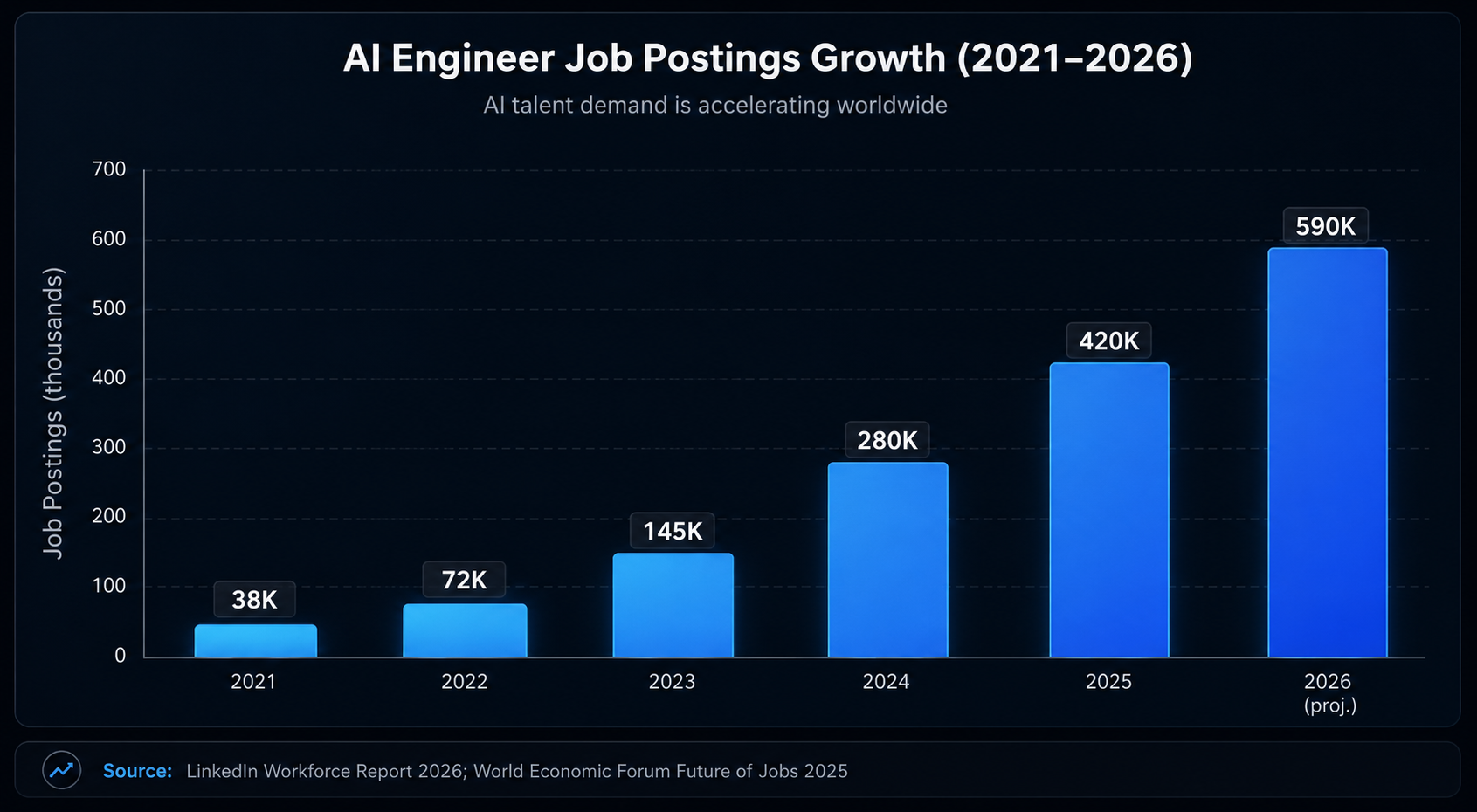
Sources: LinkedIn Workforce Report 2026; World Economic Forum Future of Jobs Report 2025
Why It Matters
AI adoption now depends on whether a system solves a business problem not on how impressive it looks in a demo. Companies want people who can build systems for areas like customer support. They also want systems for financial document analysis healthcare workflows, recommendations and code review.
That is why OneLeap focuses on learning that aligns with industries. Their learning approach is led by practitioners. It includes projects and certification based on merit. For learners mastering these tools improves how employable they are.
It also enhances the quality of projects they can handle and makes them more confident, during interviews.
Tool Adoption Rates Among AI Engineers
The following chart shows how widely each tool is used by practising AI engineers, based on aggregate developer survey data.
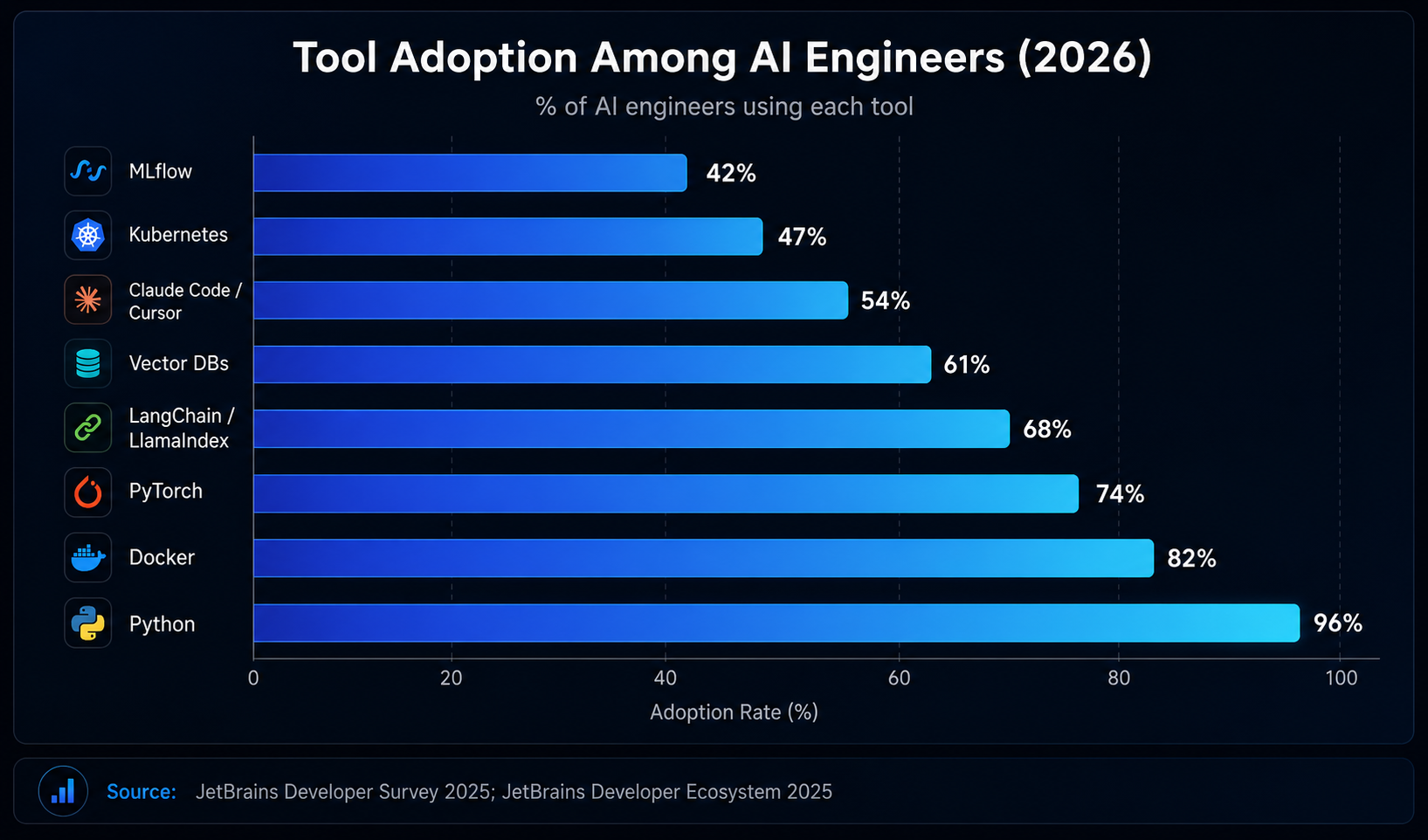
Sources: Stack Overflow Developer Survey 2025; JetBrains Developer Ecosystem Report 2025; GitHub Octoverse 2025
How It Works: The AI Engineering Workflow
1. Define the business problem
First you need to figure out what problem you are trying to solve. Is it making support tasks automatic improving search creating a workflow that can make decisions analyzing documents or generating content that involves types of data?
2. Choose the AI approach
Next decide how you will use AI to solve the problem. You can use instructions connect to existing knowledge adjust AI models to fit your needs or create an AI that can act on its own. Your choice depends on how up-to-date your data’s how hard the task is and how much risk you are willing to take.
3. Build the application layer
Now start building your system. You can use a programming language like Python connect to services with APIs add user interface components and use coding tools like Claude Code or Cursor.
4. Connect knowledge sources
To make your system smart you need to feed it information. Clean up your content break it into pieces convert it into a format that the system can understand and store it in a special kind of database that can quickly find and retrieve the information.
5. Orchestrate workflows
To make your system work smoothly you need to manage how it retrieves information uses tools and follows -step processes. You can use tools like LlamaIndex, LangChain, LangGraph or software development kits for agents.
6. Evaluate quality
After building your system test it to ensure it works well. Check if the information it provides is relevant, correct and delivered quickly and if it operates safely. Use a structured framework to evaluate these factors.
7. Deploy the system
When you’re ready package your application with Docker and scale it using cloud infrastructure or Kubernetes.
8. Monitor production behaviour
Finally keep an eye on how your system performs in real-world use. Track any changes, in its performance, costs, failures and unsafe outputs using tools and safeguards.
Core Components of the AI Engineering Stack
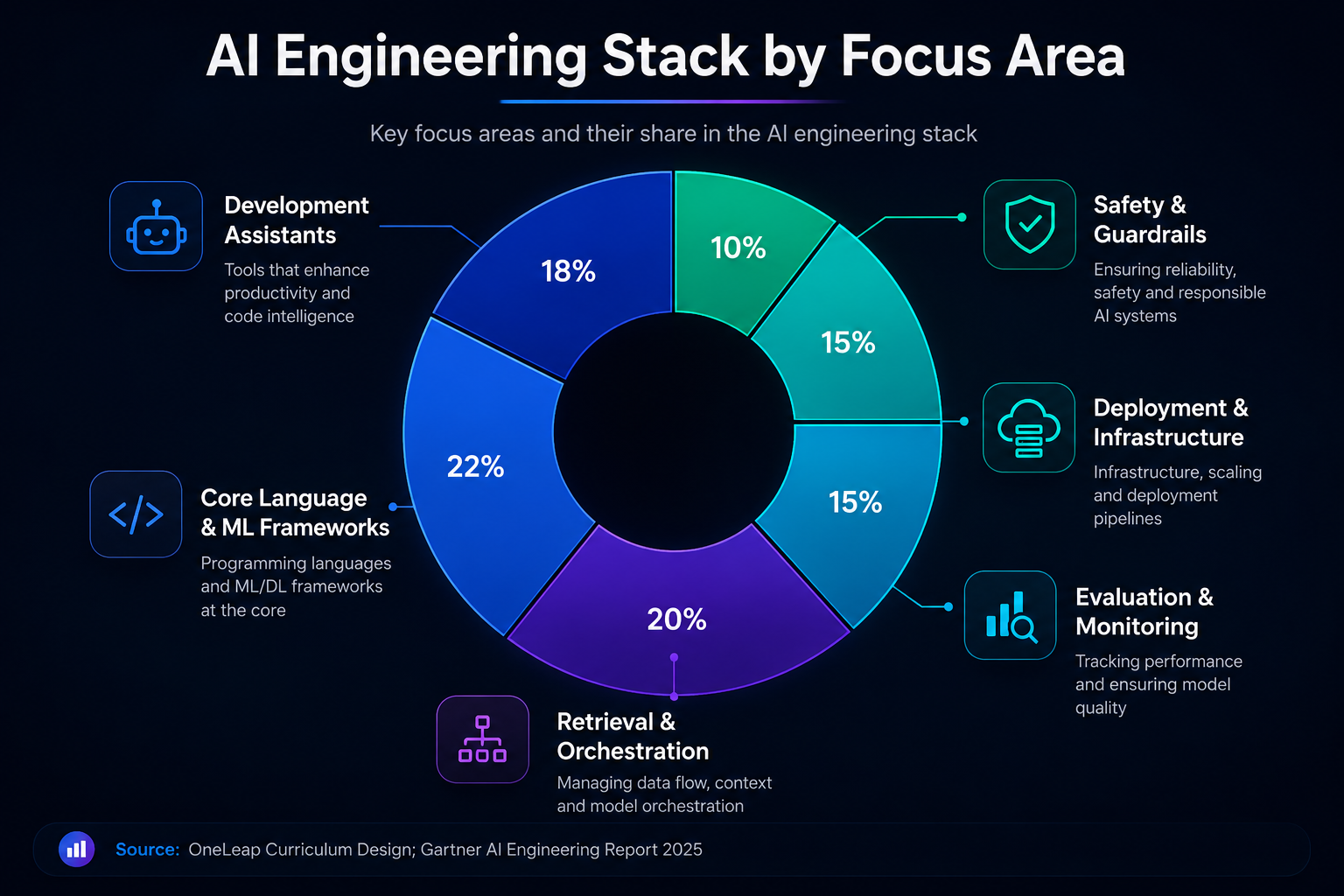
Sources: OneLeap Curriculum Design Framework; Gartner AI Engineering Report 2025
• The Development Assistant Layer is really helpful. It has Claude Code and Cursor which makes coding and editing a lot faster. You can also use it to debug your code across the entire codebase. The Development Assistant Layer is very useful for coding.
• The Core Language and Machine Learning Framework Layer is important. We use Python to build and integrate Artificial Intelligence systems. We also use PyTorch for training. Making our systems better.
• The Retrieval and Orchestration Layer is where we use LlamaIndex, LangChain and vector databases. These tools are great for applications that need to remember things and use that information to answer questions. The Retrieval and Orchestration Layer is very useful for these kinds of applications.
• The Evaluation Layer is where we test our prompts and see how well they work. We use workflows to evaluate our prompts and we also do A/B testing. The Evaluation Layer also helps us track our experiments with MLflow.
• The Deployment Layer is important because it helps us put our apps into production. We use Docker and Kubernetes to make sure our apps are reliable. The Deployment Layer also uses cloud infrastructure to make sure our apps are always available.
• The Safety Layer is like a shield that protects us from things. It has guardrails and defence against prompts. The Safety Layer also monitors what is happening. Has human checks to make sure everything is okay. The Safety Layer is very important, for keeping us safe.
Tools to Master
| Tool | Best Use | Why It Matters |
| Claude Code | Agentic coding & repo-wide changes | Multi-file edits, test runs, autonomous tasks |
| Cursor | IDE-centric development | Rapid in-editor coding and documentation |
| Python | Core AI application development | Base language for all AI engineering work |
| PyTorch | Deep learning and experimentation | Central to modern model building and fine-tuning |
| LlamaIndex | RAG and context augmentation | Connects LLMs to external data and workflows |
| LangChain | LLM orchestration | Flexible chains, tools, and agent composition |
| Vector DBs | Semantic search and memory | Powers enterprise Q&A and retrieval systems |
| MLflow | Experiment tracking | Compare runs, prompts, and performance metrics |
| Docker | Packaging and portability | Consistent deployment across all environments |
| Kubernetes | Scaling and orchestration | Production-grade infrastructure management |
| Observability Tools | Monitoring and debugging | Detect failure, drift, and security issues |
Sources: Anthropic Documentation 2026; Meta AI / PyTorch Foundation; LangChain & LlamaIndex official documentation
Real-World Examples
1. Customer Support Automation
Problem: The issue with customer support teams is that they get asked the questions over and over. They take a time to answer these customer support questions. Customer support teams deal with customer support questions every day.
Solution: We can create a tool that looks at information from product documents, FAQs and old tickets to answer customer support questions. This tool can look at product documents and FAQs to answer the customer support questions.
Result: This tool can give answers to common customer support questions. The tool is really good at answering customer support questions.
Impact: This means customer support teams have work and customers have a better experience. Customer support teams will have less to do. Customers will be happy. Some studies say this can cut the time customer support teams spend on handling questions by up to 40 percent.
2. Financial Document Analysis
Problem: The problem is that analysts spend much time reading through documents and finding important information by hand. Analysts have to read through documents and find the information.
Solution: We can use a system that reads through these documents breaks them down and finds the information in a way. The system can read through documents. Find the information.
Result:This makes it easier to find and summarize the parts of the documents. The system makes it easy to find the information in the documents.
Impact: This makes the review process faster for analysts. The review process will be faster for analysts. Bloomberg reports that analysts using intelligence can process documents up to five times faster.
3. Healthcare Triage System
Problem: The issue with teams is that they have to go through a lot of text but making mistakes can be very risky for clinical teams. Clinical teams have to go through the text.
Solution: We can adjust a system to understand the language add safety checks and monitor it to make sure it is working well for clinical teams. The system can understand the language. Have safety checks.
Result: This gives teams support for triage and reduces responses that are not safe. The system gives support for the triage.
Impact: This makes clinical teams more efficient and safer. Clinical teams will be more efficient and safer. The World Health Organization Digital Health Report 2025 talks about the benefits of using intelligence for triage for clinical teams.
Choosing the Right AI Approach
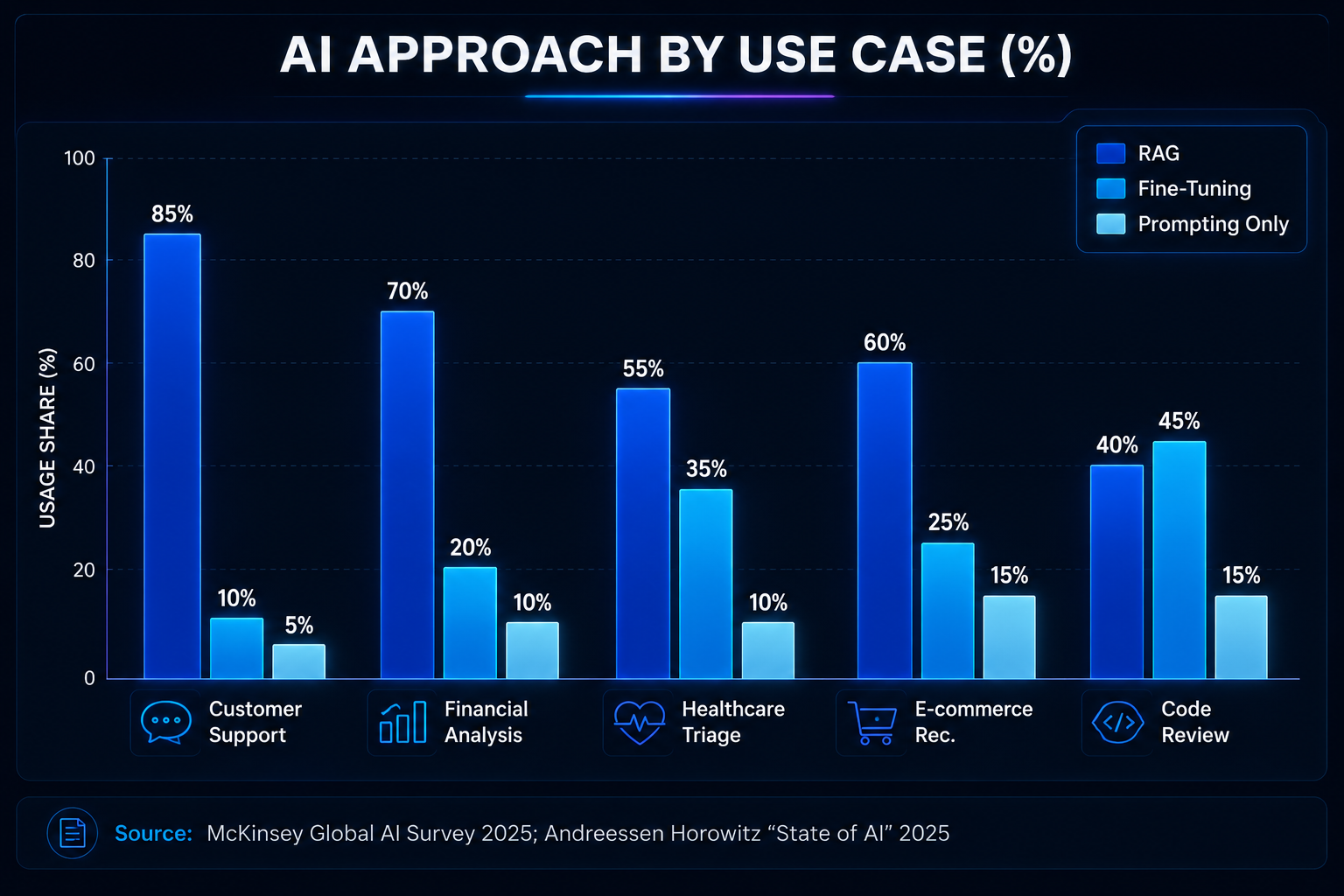
Not every use case needs fine-tuning. The chart below shows which AI approach (RAG, fine-tuning, or prompting-only) is most commonly adopted per industry use case, based on 2025 enterprise survey data.
Tool Comparisons
| Tool | Best For | Strength | Trade-Off |
| Claude Code | Terminal/repo-level engineering | Multi-file autonomous coding | Terminal-first; less IDE integration |
| Cursor | IDE-centric development | Fast in-editor editing & refactoring | Less suited for terminal-heavy tasks |
| LlamaIndex | Data-grounded AI apps | Best-in-class RAG and retrieval | Most powerful for document-heavy apps |
| LangChain | Workflow orchestration | Flexible chains, tools & agents | Broader scope, sometimes less specialised |
| FAISS | Local experimentation | Lightweight, free, no infra needed | Manual setup for production scale |
| Pinecone / Weaviate | Managed retrieval at scale | Easy ops and scaling | Vendor dependency and cost at volume |
Best Practices
• Use RAG before tuning when the problem is mostly about getting to the knowledge you need.
• You should check every change with numbers not just what you think will work.
• From the beginning of a project you need to keep an eye on how much it costs how long it. How many tokens you are using.
• For any app that people will actually use you have to add some safety measures like checking the output and making sure nobody can mess with the prompts.
• It is an idea to start with one set of tools and only add more when the project really needs it.
• You should make sure your work is based on projects so every single one shows it actually did something.
• When you want to show that something is ready to be used you should use a project to demonstrate this, not just talk about the idea, behind it.
Common Mistakes to Avoid
• We treat AI engineering like writing prompts not building a system.
• We tune too early. Sometimes using retrieval or smart prompting can fix the issue.
• We skip testing. Just do manual testing. If it looks good we ship it.
• We ignore watching how things work, how to recover from failures and safety measures.
• We use many tools at once. This makes our stack complicated and hard to maintain.
• We build demos that don’t really matter to the business or aren’t used in life.
• We forget to write down the problem we solved how we solved it the result and how it helped in our projects..
Frequently Asked Questions
Q1: What is the important skill for AI engineers in 2026?
The key skill is building systems that combine data, models, workflows and deployment. This is more important than creating prompts or demo notebooks. You need to focus on production-grade systems.
Q2: Should I learn Claude Code or Cursor
It depends on your workflow. If you do a lot of tasks across your repository start with Claude Code. If you work in an IDE and need to make edits start with Cursor.
Q: Is LlamaIndex better than LangChain?
Both tools solve problems. LlamaIndex is really good at working with data to find what you need. LangChain is more flexible. Can handle a wider range of tasks.
Q3: Why do AI engineers need tools to monitor their systems?
AI systems in production can fail in ways, such as taking too long to respond, giving incorrect answers or saying something unsafe. Monitoring tools help you catch these problems early.
Q4: Which OneLeap course is best, for this topic?
The AI Engineering Mastery course is the fit. It covers the basics, how to work with data creating agents keeping things safe deploying systems and projects that show you can handle real-world tasks.
Final Summary
In the year 2026 AI engineers should really get good at using tools that help them build, check, put out and keep an eye on production systems. The best set of tools to use includes Claude Code or Cursor, Python, PyTorch, LlamaIndex or LangChain, vector databases, MLflow, Docker, Kubernetes and tools that help you see what is going on.
OneLeaps AI Engineering Mastery course is very good for this because it teaches you by doing projects uses teachers, from the industry and helps you get a job as an AI Engineer, LLM/GenAI Engineer or AI Agents Developer.
💡 Want to build AI systems that are used in life? Check out OneLeap AI Engineering Mastery

Leave a Reply